
SAML Authentication
SAML 101
Security Assertion Markup Language (SAML) is used to share authentication and authorization between parties. SAML is often used to provide Single Sign-On (SSO) between one or multiple Service Provider(s) (SP) and one Identity Provider (IDP).
For example, users will authenticate against identity.pentesterlab.com, once authenticated, they will be able to access serviceprovider1.libcurl.so, serviceprovider2.pentesterlab.com or serviceprovider3.ptl.io without having to re-authenticate against these services. This allows enterprises to only manage one source of truth for the management of their users.
Workflow
The
User-Agent(browser) tries to access the resource.The
Service Provider(SP) sends a redirect to theIdentity Provider(IDP).The
User-Agentfollows the redirect and accesses theIDP. The request contains aSAMLRequestparameter.The
IDPsends back a response with aSAMLResponse.The
SAMLResponseis submitted by theUser-Agentto theSP.The user is now logged in for the
Service Providerand can access the resource.

Inspecting the HTTP traffic
If we look at the HTTP traffic, we can see the following requests and responses:
First, the User-Agent gets redirected to the IDP with a SAMLRequest parameter:
Then, if the user is logged in, the IDP responds with a page that will automatically (<body onload="document.forms[0].submit();"...>) submit the SAMLResponse to the SP:
This will allow the SP to create a session for the user. The user is now logged based on the SAMLResponse value.
Signature Stripping
One of the common issues with protocols relying on signatures to prevent tampering comes from the fact that the signature is only verified if it's present. Here we are going to modify the email address inside the signature to become the user admin@libcurl.so for the Service Provider and we will remove the signature.
Comment Injection
One of the common issues with protocols relying on signatures to prevent tampering comes from the fact that the signed data is parsed differently by the system receiving it. Here we are going to create a malicious email address to become the user admin@libcurl.so for the Service Provider. The issue here is that the Service Provider will stripe the XML comments from the email address provided in the SAMLResponse by the IDP.
SAML: PySAML2 SSRF

The SSRF occurs in the URI field of the ds:Reference node of a SAML response. Normally, these look like this:
but you can change them to something like this:
and the URI will be resolved internally.
CVE-2021-21239
Get the SAML Response and remove the values in:
ds:SignatureValueandds:DigestValueRemove the URI in the
ds:ReferencetagReplace the full
ds:x509DataTag with the placeholderRemove any extra spaces or new lines.
Sign the SAMLResponse using
xmlsec --signand a private keyRe-encode the SAMLResponse and send it to the Service Provider
CVE-2021-21239 (PySAML2)
Authentication Bypass
Sign into
target.comas an organization owner (attacker).Configure a SAML 2.0 Provider (Okta) on your attacker account by following SAML docs
Enable SAML authentication and Enable user provisioning
In your SAML IdP (Okta admin console), create/add a person with the victim email and set a password for that account.
Press enter or click to view image in full size
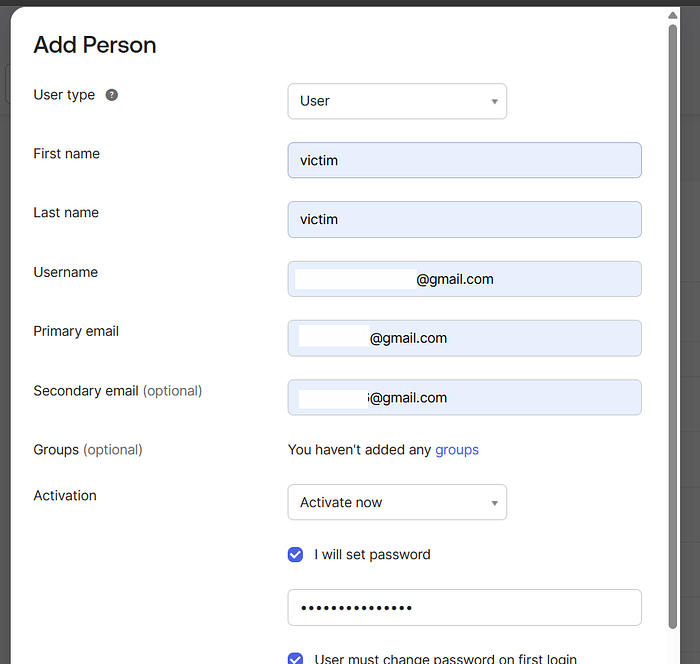
5. Also at Okta assign that newly created user to the Org application in Okta (so SAML assertions can be made).
Okta assignments path :
https://trial-#lol-admin.okta.com/admin/app/org/instance/<INSTANCE_ID>#tab-assignmentsAdd user
<victim@example.com>to the org app.
Press enter or click to view image in full size

6. Open an incognito/private browser window and navigate to your org’s SAML login URL (IdP-initiated) and sign-in with the victim email and the password you set in Okta:
Email: victim@example.com
Password: (the password attacker set during creation)
7. After successful IdP authentication, the SP ( target.com) issues a session.
As the attacker (exploit actions enabled by the victim session)
8. With the attacker-controlled session that now contains the victim user id (but attacker account id in token), issue requests that rely on user id for authorization (example: edit user settings).
Last updated